

Guide · November 2026
A link in bio that answers questions, and why followers comment "link?"
A link in bio that answers questions is a creator's Product Expert link. A follower taps it, asks which product fits, and gets an answer from the products that creator approved, then a path to the brand's own checkout. Followers comment "link?" because a page of URLs does not name the product in the post, and it cannot answer the next question about fit, price, or the difference between two items.
AI Product Experts that sell. You pay only when they do.
Clickless: AI Product Experts that sell. You pay only when they do. The commerce layer for AI agents. Clickless Product Experts know a brand's products, or the products a creator approves, and help sell those products and offers 24/7. For a creator, the link is free to start. For a brand, there is no setup or monthly fee.
1
Why do followers comment "link?"?
The comment is a short way to ask for the product in the post. A bio often holds several destinations at once: a shop, a mailing list, last week's video, and a separate URL for each brand. "Link?" means "which of these is the one you just showed?" Once they have a URL, a second question usually follows. Will it fit in a carry-on? Is this the smaller one? What is different about the two you named?
A Product Expert answers in your voice, from the products you approve, and it stays in the chat until the person is ready to continue on the brand's own site.
2
What opens when someone taps the link?
Your link is a web chat at its own address. It works in phone browsers and in in-app browsers, so the same URL can sit in an Instagram bio, a TikTok bio, a YouTube description, a story you share, or a QR code on packaging, in print, or at an event. What an AI Product Expert is is the short definition of the chat.
For a creator, the chat knows the products you approve. It recommends what fits, applies the deal the brand set, and sends the shopper to the brand's own checkout. The brand stays the merchant. The shopper pays there, and the brand ships. Clickless does not take the payment and does not hold the goods. That deal is the brand's own offer on its own product. Clickless is not a coupon site.
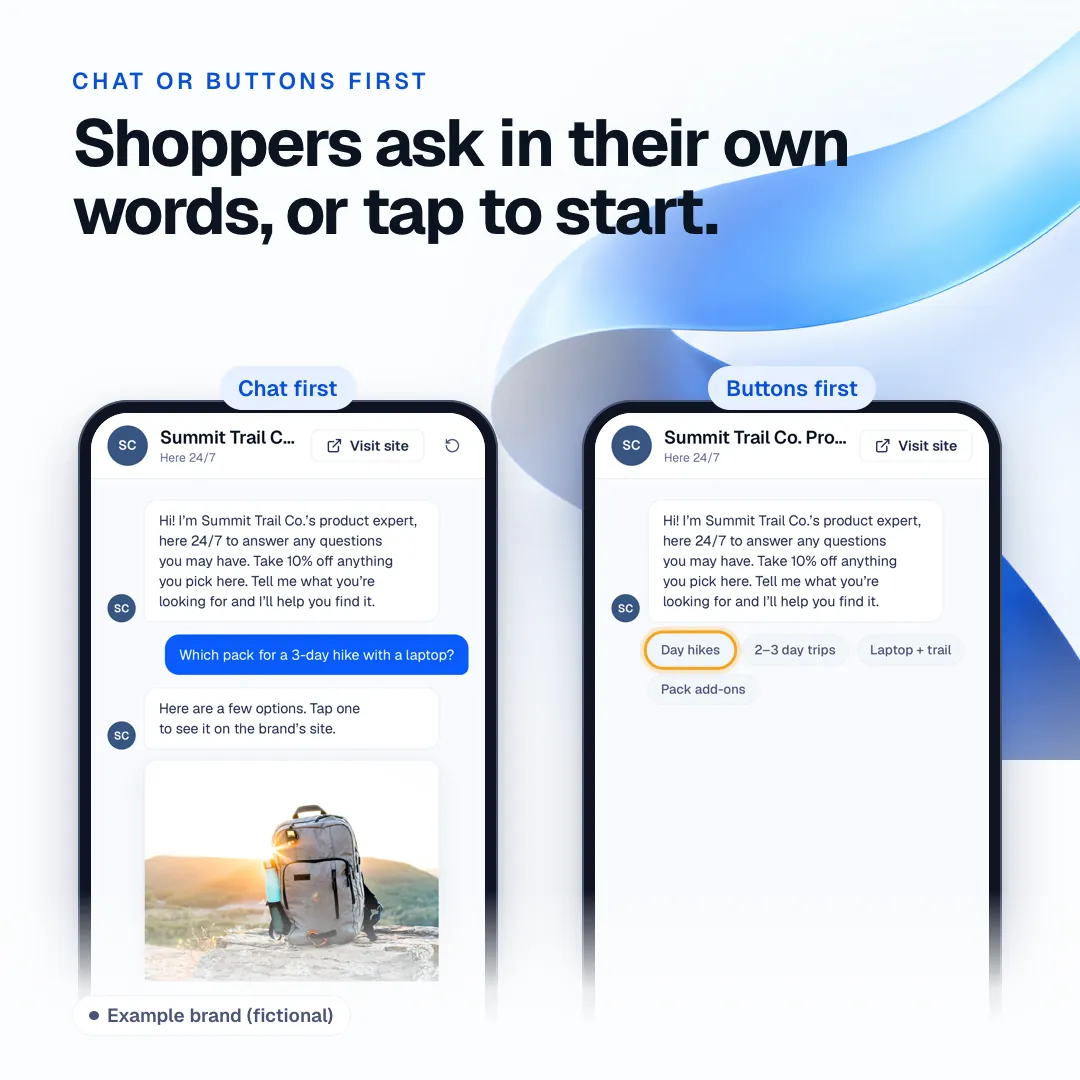
This frame is a Clickless ad showing Summit Trail Co., an example brand (fictional). A creator's link opens this kind of chat and introduces itself as that creator's product expert.
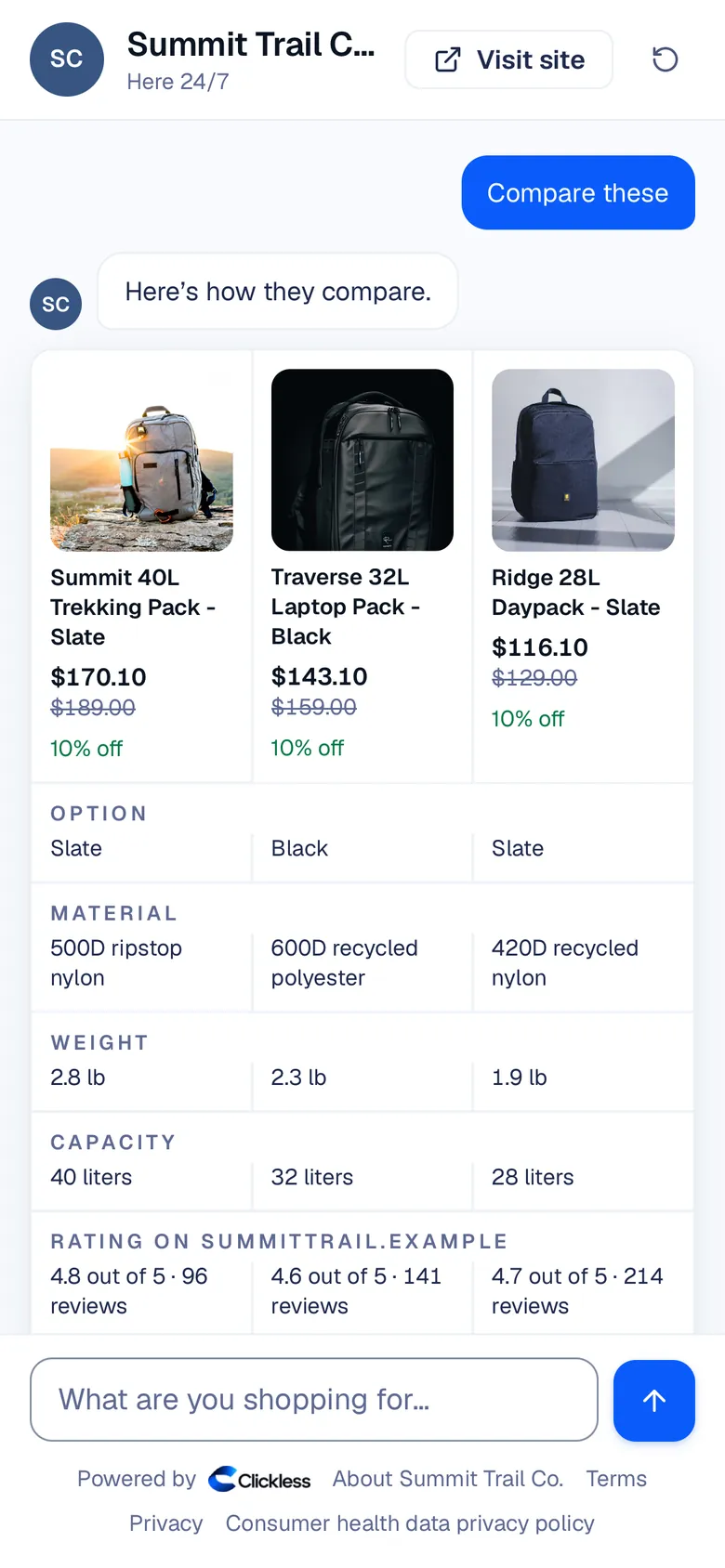
A brand's Product Expert can show two or three picks side by side. This brand is fictional, and the prices are part of the example, not a published result.
3
What questions can someone ask there?
The person can type the next question in their own words.
| They ask | What the chat does |
|---|---|
| Which product was in the post? | Recommends from the products you approved |
| Which of these fits what I need? | Uses the facts that come with those products |
| What is the price with the deal? | Shows the price with the brand's deal applied |
| Where do I buy it? | Sends them to the brand's own checkout |
Which product was in the post?
- What the chat does
- Recommends from the products you approved
Which of these fits what I need?
- What the chat does
- Uses the facts that come with those products
What is the price with the deal?
- What the chat does
- Shows the price with the brand's deal applied
Where do I buy it?
- What the chat does
- Sends them to the brand's own checkout
Every reply it writes is checked before it is sent. It answers from the products you approved and from the catalog facts that come with them.
4
What does the chat say about itself?
It opens by naming itself as your product expert, here 24/7 to answer questions, and then it asks the question you set for how it starts chats. It never poses as you. Before it shares a link, a creator's Product Expert says it earns: "Heads up: I earn from links I share." If someone asks whether it is a person, it says it is an AI product expert, not a person. You can read every conversation, and you can pause the Product Expert everywhere at once.
5
Where does the link work today?
These paths are live:
The link itself, anywhere a profile accepts a URL. Phone browsers and in-app browsers open it.
Instagram DMs from your own account, through Meta's official messaging API. The Product Expert replies to people who message you, to story replies, to a keyword sent in a DM, and to ice-breaker taps in the Instagram inbox. Meta approved this messaging on October 28, 2026.
YouTube, as a link. YouTube has no DMs, so the URL goes in the video description and in comments you write yourself.
QR codes on packaging, in print, and at events.
TikTok DMs are not part of the product. A TikTok ad can send someone to the web chat, and the same link works inside an in-app browser, including a profile bio.
Comment replies are a separate path, and they are not live.
A reply to a comment, including when someone comments "link?", is rolling out. It is coming once Meta approves comment access. That permission was resubmitted on October 30, 2026. Comment-to-DM is not live. Until Meta approves comment access, a comment does not start a Product Expert message. Point people to your link, or answer in a DM they started.
Keywords in DMs and story replies are live. Keywords on comments roll out with comment replies. If you are moving a keyword list over from another tool, you can paste or upload the list, and nothing goes live until you switch it on. How that move works is covered in the ManyChat alternative for creators. A wider look at keyword tools is on the keyword DM tools comparison.
The Product Expert never sends a cold message. It replies to people who message you or, once comment access is approved, to a comment. Clickless uses Meta's official messaging API. Clickless is not affiliated with Meta. Instagram is a trademark of Meta Platforms, Inc. Facebook Messenger is rolling out on its own review, separate from Instagram, so this guide does not treat Messenger as live.
6
How do you set the link up?
Creators can sign up on the creators page. No following is required.
Pick the products you would recommend. The Product Expert recommends from those products.
Practice with it. You set the voice. It still introduces itself as your product expert.
Run the final check. Before it goes live, it answers 9 test questions.
Share the link. Put it in the bio. In a product post, you can write a line such as "Not sure which one? Ask at the link in my bio." You write that line. The Product Expert does not post it for you.
Most brands are live within two business days. That line is about connecting a brand's catalog. You still place the link in the bio yourself. Selling your own products from the link is not open yet. That part is rolling out. Today the chat recommends products you approve from brands on Clickless.
7
When is a list of links the better fit?
A list of links and a Product Expert link do different jobs, and many creators will use the two together.
Linktree's own public description, read November 11, 2026, calls link in bio one feature of its platform, not the whole product. It names Free, Starter, Pro, and Premium plans, and it also names Agency and Enterprise. It says the free plan includes unlimited basic links, selling products and courses, and earning from brand offers. The same description lists Instagram auto-replies. Its pricing page says prices vary by region and are shown in local currency, with monthly or annual billing, so this guide does not quote a dollar figure. Those statements come from Linktree's public product description and Linktree's pricing page, accessed November 11, 2026.
| A list of links | A Product Expert link | |
|---|---|---|
| What the follower gets | A page of destinations | An answer, then the brand's checkout |
| The follow-up question | They pick a URL and leave | Answered in the chat, in your voice |
| Who is speaking | Your page | Your product expert, and it says so |
| Earning from a link | You write the note on the page | It says you earn before any link |
| Replies to Instagram comments | Linktree lists auto-replies on its own site | Rolling out, and not live, until Meta approves comment access |
| What you pay | That tool's own plans, which vary by region | Free to start for creators. Brands pay only when it sells, with no setup or monthly fee |
What the follower gets
- A list of links
- A page of destinations
- A Product Expert link
- An answer, then the brand's checkout
The follow-up question
- A list of links
- They pick a URL and leave
- A Product Expert link
- Answered in the chat, in your voice
Who is speaking
- A list of links
- Your page
- A Product Expert link
- Your product expert, and it says so
Earning from a link
- A list of links
- You write the note on the page
- A Product Expert link
- It says you earn before any link
Replies to Instagram comments
- A list of links
- Linktree lists auto-replies on its own site
- A Product Expert link
- Rolling out, and not live, until Meta approves comment access
What you pay
- A list of links
- That tool's own plans, which vary by region
- A Product Expert link
- Free to start for creators. Brands pay only when it sells, with no setup or monthly fee
8
How is a sale from the link traced?
Every conversation carries a token from the link that opened it. The token rides to the brand's checkout, and the store reports the order back. When the visit did not come from an ad, an order is credited within 60 days of the Product Expert showing the offer. One order, one agent, one fee. On brands on Clickless, you keep a share of the commission Clickless receives. The brand pays the fee on creator sales, not you. Payouts are rolling out. Until they switch on, earnings wait in the balance. Clickless does not publish income figures, and this page does not guess what a creator earns. Nothing a shopper says is sent to an ad platform.
9
Where do you start?
Get your Product Expert link on the creators page. It is free to start. Read what an AI Product Expert is for the definition, and the ManyChat alternative for creators if you already answer with keywords.
Sources
Questions creators ask
Why do followers comment "link?"?
They are asking which URL matches the product in the post, and often what fits them next. A page of links can list destinations. It cannot say which product was in the video, or answer a follow-up about fit, price, or the difference between two products.
Can I put a Product Expert link in my bio today?
Yes. Creators can sign up and share your link. It works in phone browsers and in-app browsers, including an Instagram or TikTok bio and a YouTube description. Instagram DMs from your own account are live too: the Product Expert replies to people who message you, to story replies, and to a keyword sent in a DM. It is free to start, and no following is required.
Does it reply when someone comments "link?"?
No. Comment replies are not live. Comment-to-DM is rolling out, coming once Meta approves comment access. That permission was resubmitted on October 30, 2026. Until then, a comment does not start a Product Expert message. Send people to your link, or answer in a DM they started. Keywords in DMs and story replies are answered today.
Does the Product Expert pretend to be me?
No. It introduces itself as your product expert, here 24/7 to answer questions. Before it shares a link it says, "Heads up: I earn from links I share." If someone asks whether it is a person, it says it is an AI product expert, not a person. You can read every conversation and pause it everywhere at once.
What does a creator pay?
It is free to start. This page does not quote a creator price beyond that. Brands pay only when a Product Expert sells, with no setup or monthly fee. On brands on Clickless, you keep a share of the commission Clickless receives, and the brand pays the fee on creator sales, not you. Payouts are rolling out, so earnings wait in the balance until payouts switch on. Clickless does not publish income figures.
Can I sell my own product from this link?
Not yet. A creator's own products are rolling out and are not open yet. Today the Product Expert recommends products you approve from brands on Clickless, and the shopper checks out on that brand's site.
Related guides
ManyChat alternative for creators: a Product Expert behind your link
A ManyChat alternative that answers follow-up questions, recommends products you approve, and credits the sale. Free to start.
Read the guide: ManyChat alternative for creators: a Product Expert behind your link
ManyChat vs Clickless for creators (Nov 2026)
ManyChat bills by active contacts. Clickless is free to start: a Product Expert answers follow-ups on products you approve. Checked Oct. 28, 2026.
Read the guide: ManyChat vs Clickless for creators (Nov 2026)
Answering the follow-up question: ManyChat's AI vs a Product Expert
ManyChat AI replies answer from text and public URLs you add. A Product Expert answers the next shopping question from products you approve.
Read the guide: Answering the follow-up question: ManyChat's AI vs a Product Expert

Get your Product Expert link. It’s free to start.
Approve the products you already recommend, practice with it, and share your link.