

Glossary · October 2026
Ad-to-agent glossary
Short, plain definitions of the terms that come up when ads open a Product Expert instead of a landing page. Each entry says what the term means in general, and how Clickless uses or counts it.
1
Product Expert
A Product Expert is Clickless’s name for a chat agent, owned by a brand or a creator, that answers shoppers’ questions, recommends what fits and sends shoppers to the brand’s own checkout, with each sale traced to what started the chat.
The wider category is often called an AI shopping agent. A brand’s Product Expert answers from the brand’s own site, catalog and approved answers, in the brand’s voice. A creator’s recommends only the products the creator approves, says it earns a commission before any link, and never poses as the creator.
It opens from an ad, a link, a QR code or an Instagram DM; comment replies are coming once Meta approves comment access. It says plainly that it’s an AI whenever asked, and never claims to be a person.
2
Message match
Message match means the page or chat an ad opens says the same thing the ad said: the same product, the same promise and the same deal.
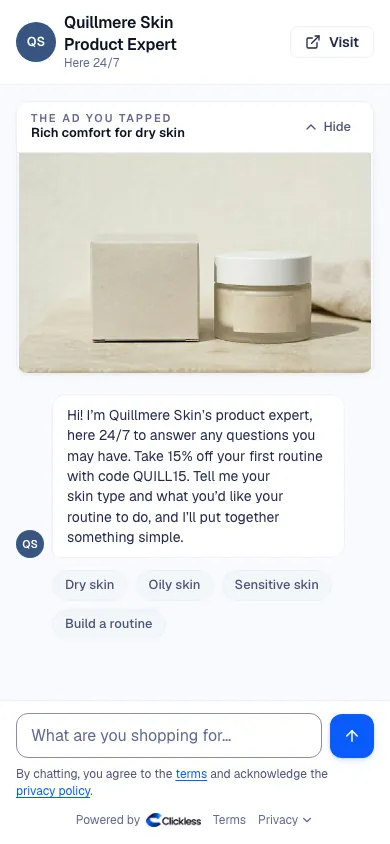
When an ad promises “rich comfort for dry skin” and the tap lands on a home page, the shopper has to find their way back to that promise, and some never do. Good message match keeps the first screen on the ad’s point.
In a Product Expert: each ad can have its own First line for this ad, its own deal and its own opening (chat, buttons or a quiz first). The ad’s setup can also say what the ad is about and which products to lead with, and show the ad at the top of the chat. A “dry skin” ad can open on the moisturizer that ad showed, with that ad’s deal applied. There’s no new landing page to build.
3
7-day click
A 7-day click window counts a purchase if it happens within 7 days of someone clicking the ad.
Meta’s default attribution setting for website purchases includes a 7-day click window. According to a third-party summary, Jon Loomer’s How Meta Ads Attribution Works in 2026 (Jon Loomer Digital, Mar. 10, 2026), since March 2026 Meta counts a click-through purchase only after a click on the ad’s link; purchases after likes, comments and other clicks on the ad moved to a separate 1-day “engage-through” window. Check the setting in your own ad account.
How Clickless counts it: a sale from an ad counts within 7 days of the ad click by default, the same as Meta’s standard click window. A brand can choose 28 or 60 days instead, under How long after an ad click a sale counts. A sale after the window is still matched to the ad and sits in its own column in the Ads report, but it’s kept out of the headline number and not billed.
When a brand connects its Meta ad account (read-only), the Ads report also shows Meta’s own 7-day click count, labeled Meta: clicks (7 days).
4
View-through
View-through attribution credits a sale to an ad the buyer saw but didn’t click.
Meta’s default setting counts some purchases within 1 day of a view. The case for it: ads shape what people buy even without a click. The case against it: people who were going to buy anyway also see ads, so view-through can credit an ad with sales it didn’t cause.
How Clickless counts it: never. Clickless credits a sale to an ad only after a click, and doesn’t bill on views. The Ads report can show Meta’s clicks-plus-views count beside its own, labeled Meta: clicks + views (7d/1d).
The numbers on Clickless results are Meta-reported, on Meta’s default attribution, so they include purchases counted on a 1-day view.
5
Add-to-cart
An add-to-cart is a shopper putting a product in their cart. Add-to-cart rate is add-to-carts divided by visits or sessions.
Add-to-carts sit between interest and purchase, so they show where a page loses people: lots of visits and few add-to-carts often means the page didn’t answer something.
Careful with a Product Expert: when a shopper is ready, the Product Expert hands them to checkout with the item already in the cart. Its add-to-carts aren’t the same act as tapping “Add to cart” on a product page, so compare it on purchases.
6
Cost per purchase
Cost per purchase is ad spend divided by purchases in the same period, counted with the same attribution setting.
Also called cost per acquisition (CPA) when the acquisition is a purchase. $2,000 of spend and 25 purchases is $80 per purchase. It’s the number to compare when you test two destinations for the same ad, because it puts spend and sales in one figure.
Two cautions. Compare it only between numbers counted the same way: Meta’s number with Meta’s number, on the same attribution setting. And read it beside order value: a lower cost per purchase on cheaper orders can still earn less. ROAS (revenue divided by ad spend) covers the second point.
In Clickless’s Ads report, each ad shows its spend and cost per sale on the count you pick: Confirmed in your store, Meta: clicks (7 days) or Meta: clicks + views (7d/1d).
7
50/50 test
A 50/50 test splits people evenly between two versions, so each person sees only one, then compares the results.
Two kinds come up with a Product Expert:
| Test | What it compares | Where it’s set |
|---|---|---|
| Destination test | Your landing page vs your Product Expert, for the same ad | Meta’s A/B test: duplicate the ad set and change only the website URL |
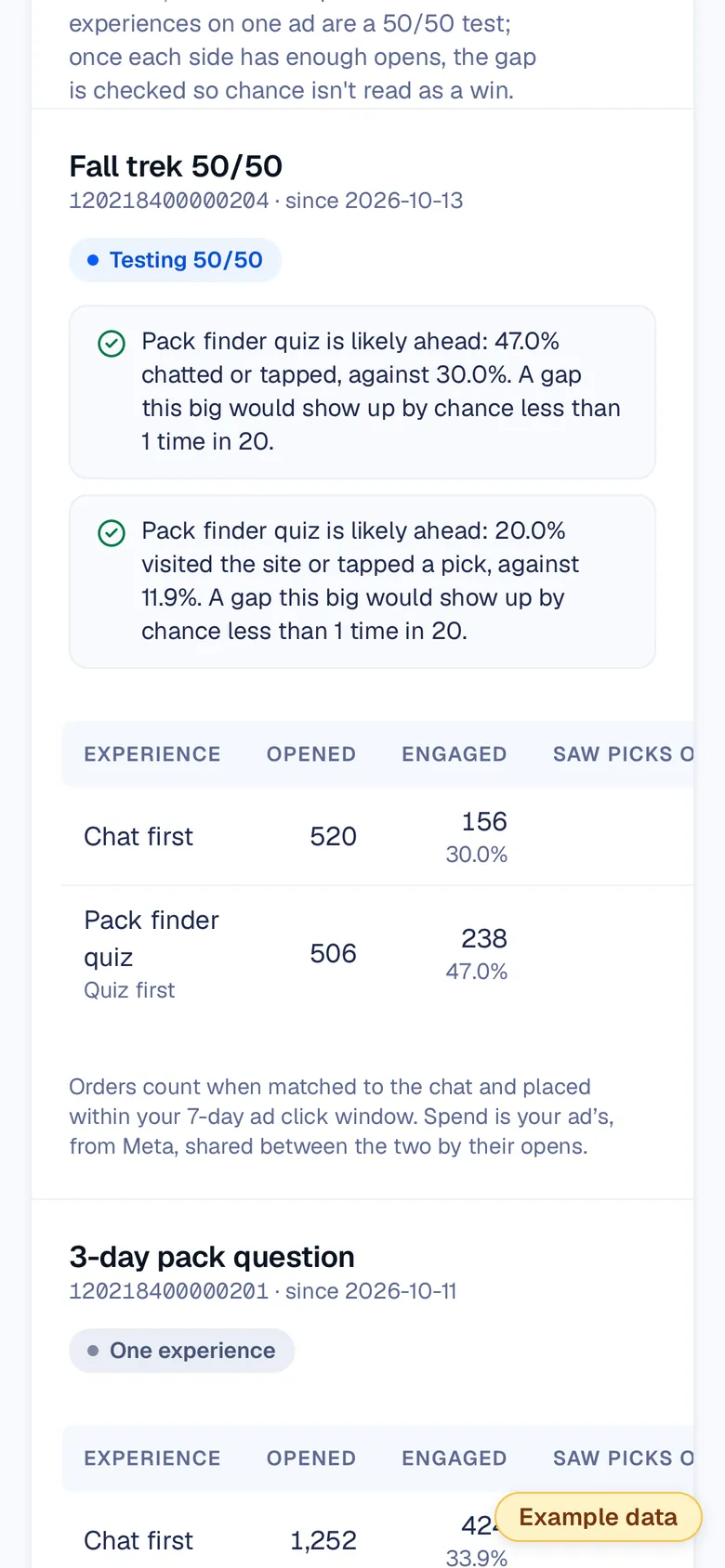
| Opening test | Two ways your Product Expert’s chat opens (a chat, buttons or a quiz), for the same ad | In Clickless, with Test two openings (50/50); each shopper keeps their side |
Destination test
- What it compares
- Your landing page vs your Product Expert, for the same ad
- Where it’s set
- Meta’s A/B test: duplicate the ad set and change only the website URL
Opening test
- What it compares
- Two ways your Product Expert’s chat opens (a chat, buttons or a quiz), for the same ad
- Where it’s set
- In Clickless, with Test two openings (50/50); each shopper keeps their side
Run a destination test for at least 7 days, one full click window. In an opening test, Clickless’s report calls a side “likely ahead” only after 100 opens per side, and only when a gap that big would show up by chance less than 1 time in 20; until then it says “Too close to call.”
8
Click window
A click window is how long after an ad click a sale still counts for that ad.
In Clickless the setting is How long after an ad click a sale counts: 7 days by default, or 28 or 60 days if the brand chooses. A sale after it is still shown, in its own column, but isn’t billed. For traffic that didn’t come from an ad, like a link in a bio or an email, an order is credited within 60 days of the Product Expert showing the offer.
9
Confirmed in your store
Confirmed in your store is Clickless’s label for orders your own store reported back as coming from your Product Expert.
Every chat carries a reference from the ad or link that opened it. It rides to your checkout, and your store reports the order back: Shopify stores automatically, stores not on Shopify with an order export each week.
Once you connect your Meta ad account (read-only; nothing is sent to Meta), the Ads report shows these orders beside the purchases Meta reports, ad by ad, so you can see both counts at once.
10
First line for this ad
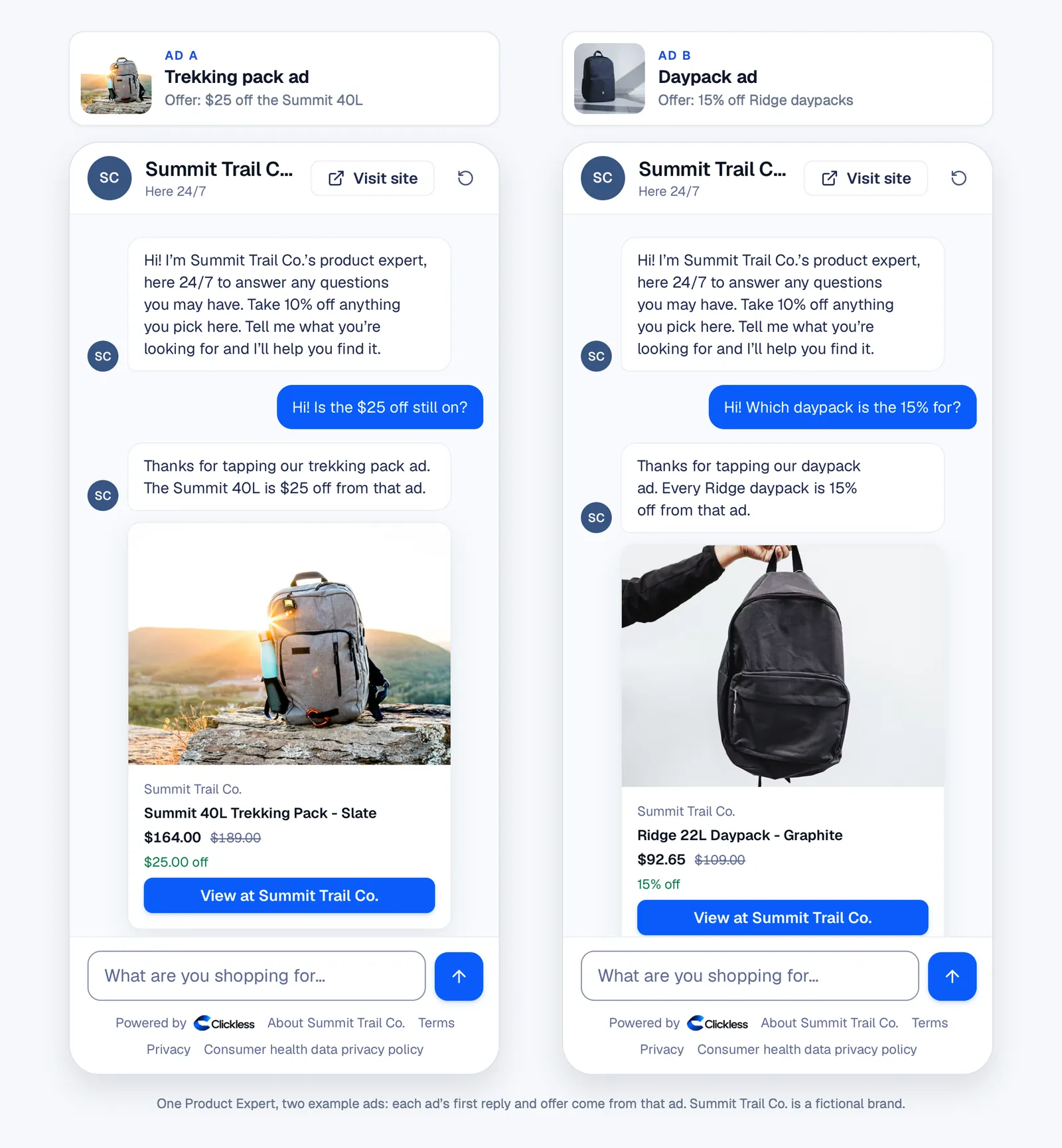
First line for this ad is the opening line a Product Expert uses for shoppers who arrive from one particular ad.
It’s how a Product Expert keeps message match: the ad about the morning routine opens on the morning routine, with that ad’s deal.
Questions people ask
What’s the difference between a 7-day click and view-through?
A 7-day click counts a purchase made within 7 days of someone clicking the ad. View-through counts a purchase by someone who saw the ad but didn’t click it. Clickless counts clicks only, never views.
What is message match in advertising?
Message match means the page or chat an ad opens says the same thing the ad said: the same product, the same promise and the same deal, so the shopper knows they’re in the right place.
How do you calculate cost per purchase?
Divide ad spend by the number of purchases in the same period, counted with the same attribution setting. $2,000 of spend and 25 purchases is $80 per purchase.
What is a 50/50 test?
A test that splits people evenly between two versions so each person sees only one, then compares results. Media buyers use it to test an ad’s destination, and brands use it to test how their Product Expert’s chat opens.

Put the terms to work.
Free 7-day test: no Clickless fee on sales in your Product Expert’s first 7 days live. You still pay for your own ads.