

Guide · November 2026
ManyChat alternative for creators: a Product Expert behind your link
A ManyChat alternative with AI answers is a Product Expert behind your link. It recommends the products you approve, answers the follow-up ("will it fit?", "which one?"), says it earns a commission before any link, and sends the shopper to the brand's own checkout. On Clickless that link is free to start and works today in phone browsers and in-app browsers. Instagram comments and direct messages are rolling out, not live yet: they switch on once Meta approves the app.
AI Product Experts that sell. You pay only when they do.
Clickless: AI Product Experts that sell. You pay only when they do. The commerce layer for AI agents. That line is the brand's fee. As a creator, you don't pay it. You earn a share of the commission, and recommending brands on Clickless is free to start.
A Product Expert is a chat that knows the products you approve and answers in your voice. The brand stays the merchant: the shopper pays on the brand's checkout, and the brand ships. What is an AI Product Expert?
1
What does ManyChat do well for creators?
ManyChat is a mature chat-marketing tool, and plenty of creators should keep it. This is what its own help center said when we read it on October 31, 2026. The plan articles were last updated August 27, 2026. Prices vary by region. The current model started March 2, 2026, and by default it covers accounts created on or after that date. An older account may still be on older prices.
Comment triggers you can aim. On Instagram posts and reels, a trigger can watch one post, every post, or the next one you publish. It can start on words you include, skip words you exclude, or start on any comment, then post a public reply and send a private message. ManyChat says the trigger runs once per person per post or reel, that the limit comes from Instagram, and that it applies to tools using Instagram's API.
Flows you design. You build the next step: a message, a button, a condition, a delay.
Lead capture on paid plans. Essential includes email and phone capture, tags, and a Google Sheets sync. Pro adds email, SMS, CRM, and commerce integrations, plus WhatsApp, SMS, and email as channels.
AI answers, with a caveat. ManyChat AI can answer Instagram questions from a knowledge library you fill in, reply to positive comments, and steer a chat toward a goal you set. The help center calls this an add-on on a paid plan, says it is in beta, and limits those replies and comments to Instagram. The Pro article lists AI-powered automation as part of Pro. The pages we read do not say whether that add-on costs extra on top of Pro.
A price tied to active contacts, not followers. An active contact is someone who interacts through ManyChat during the billing month. Your follower count is not the bill. The same person counts once that month.
Monthly prices, billed monthly, from those plan articles:
| Plan | Active contacts a month | Price, billed monthly |
|---|---|---|
| Free | 25, and up to 4 automations live at once | $0 |
| Essential | 250 | $17 a month ($14 a month if billed yearly) |
| Pro | 2,500 | $39 a month ($29 a month if billed yearly) |
| Business | 7,500 | $99 a month ($69 a month if billed yearly) |
Free
- Active contacts a month
- 25, and up to 4 automations live at once
- Price, billed monthly
- $0
Essential
- Active contacts a month
- 250
- Price, billed monthly
- $17 a month ($14 a month if billed yearly)
Pro
- Active contacts a month
- 2,500
- Price, billed monthly
- $39 a month ($29 a month if billed yearly)
Business
- Active contacts a month
- 7,500
- Price, billed monthly
- $99 a month ($69 a month if billed yearly)
Essential and Pro each include 14 days to try the plan. Past the contact count, ManyChat adds an overage on the next bill (Essential $0.10, Pro $0.05, Business $0.025 per extra contact on monthly billing). Automations keep running until a cap you set, or until the account grows far past the plan, when ManyChat says they may pause. A higher plan exists; this page stops at the Business price we re-read on October 31, 2026.
ManyChat Help Center, read October 31, 2026: Active Contacts, Free, Essential, Pro, Business, the Instagram comments trigger, and ManyChat AI. Articles last updated August 27, 2026. Prices vary by region and may have changed since.
2
When should a creator keep ManyChat?
Keep ManyChat when the job is the flow, not the product question.
You want Instagram comment-to-DM running on your account today. Clickless comments and direct messages are still rolling out.
Your messages are mostly giveaways, freebies, and list building, with tags and email or phone capture.
You want to design every step of the path yourself.
You want several channels in one builder. Free and Essential connect up to two of Instagram, TikTok, Messenger, and Telegram. Pro adds WhatsApp, SMS, and email among up to three channels. Business connects those channels without that cap.
Clickless has no broadcast tool and no email-marketing tool today. It is built for the questions a follower asks before they buy.
For a wider look at keyword tools, see Clickless and keyword auto-DM tools. Brands running the same idea on ads have a separate guide: comment-to-DM for brands.
3
How is a Product Expert different?
ManyChat sends the path you built. A Product Expert answers from the products you approved, including a question you did not write a step for.
| ManyChat (help center, read October 31, 2026) | Clickless Product Expert | |
|---|---|---|
| What starts it | A comment on a post or reel you choose, or another trigger you build | A tap on your link, which works today. A keyword comment on Instagram is rolling out |
| What the follower gets | The reply or flow you built | An answer in your voice, with a product you approved |
| Follow-up questions | The next step in your flow, or ManyChat AI on Instagram if the AI add-on is on (beta) | Answered in the chat from the products you approved, including which one fits |
| Which products | The links you put in the flow | Products you approve from brands on Clickless |
| Disclosure | Whatever you write into the flow | It says it earns a commission before any link |
| How a sale is tied to you | Whatever affiliate program or commerce integration you connect yourself | On brands on Clickless, the sale is traced from your link to the brand's order and credited to you |
| What you keep | Whatever your own affiliate programs pay you | A share of the commission Clickless receives |
| Price | $0, then $17, $39, and $99 a month by active contacts, with yearly billing lower | Free to start. See pricing |
| Setup | Build the flow, then set it live | Pick your products, practice, run the final check, share your link |
What starts it
- ManyChat (help center, read October 31, 2026)
- A comment on a post or reel you choose, or another trigger you build
- Clickless Product Expert
- A tap on your link, which works today. A keyword comment on Instagram is rolling out
What the follower gets
- ManyChat (help center, read October 31, 2026)
- The reply or flow you built
- Clickless Product Expert
- An answer in your voice, with a product you approved
Follow-up questions
- ManyChat (help center, read October 31, 2026)
- The next step in your flow, or ManyChat AI on Instagram if the AI add-on is on (beta)
- Clickless Product Expert
- Answered in the chat from the products you approved, including which one fits
Which products
- ManyChat (help center, read October 31, 2026)
- The links you put in the flow
- Clickless Product Expert
- Products you approve from brands on Clickless
Disclosure
- ManyChat (help center, read October 31, 2026)
- Whatever you write into the flow
- Clickless Product Expert
- It says it earns a commission before any link
How a sale is tied to you
- ManyChat (help center, read October 31, 2026)
- Whatever affiliate program or commerce integration you connect yourself
- Clickless Product Expert
- On brands on Clickless, the sale is traced from your link to the brand's order and credited to you
What you keep
- ManyChat (help center, read October 31, 2026)
- Whatever your own affiliate programs pay you
- Clickless Product Expert
- A share of the commission Clickless receives
Price
- ManyChat (help center, read October 31, 2026)
- $0, then $17, $39, and $99 a month by active contacts, with yearly billing lower
- Clickless Product Expert
- Free to start. See pricing
Setup
- ManyChat (help center, read October 31, 2026)
- Build the flow, then set it live
- Clickless Product Expert
- Pick your products, practice, run the final check, share your link
ManyChat column: the help-center pages listed above, read October 31, 2026. ManyChat may have changed them since. Clickless column: product facts as of October 26, 2026, including Instagram still rolling out.
4
How do you set up a Product Expert?
Pick your products. Approve brands on Clickless you would recommend anyway.
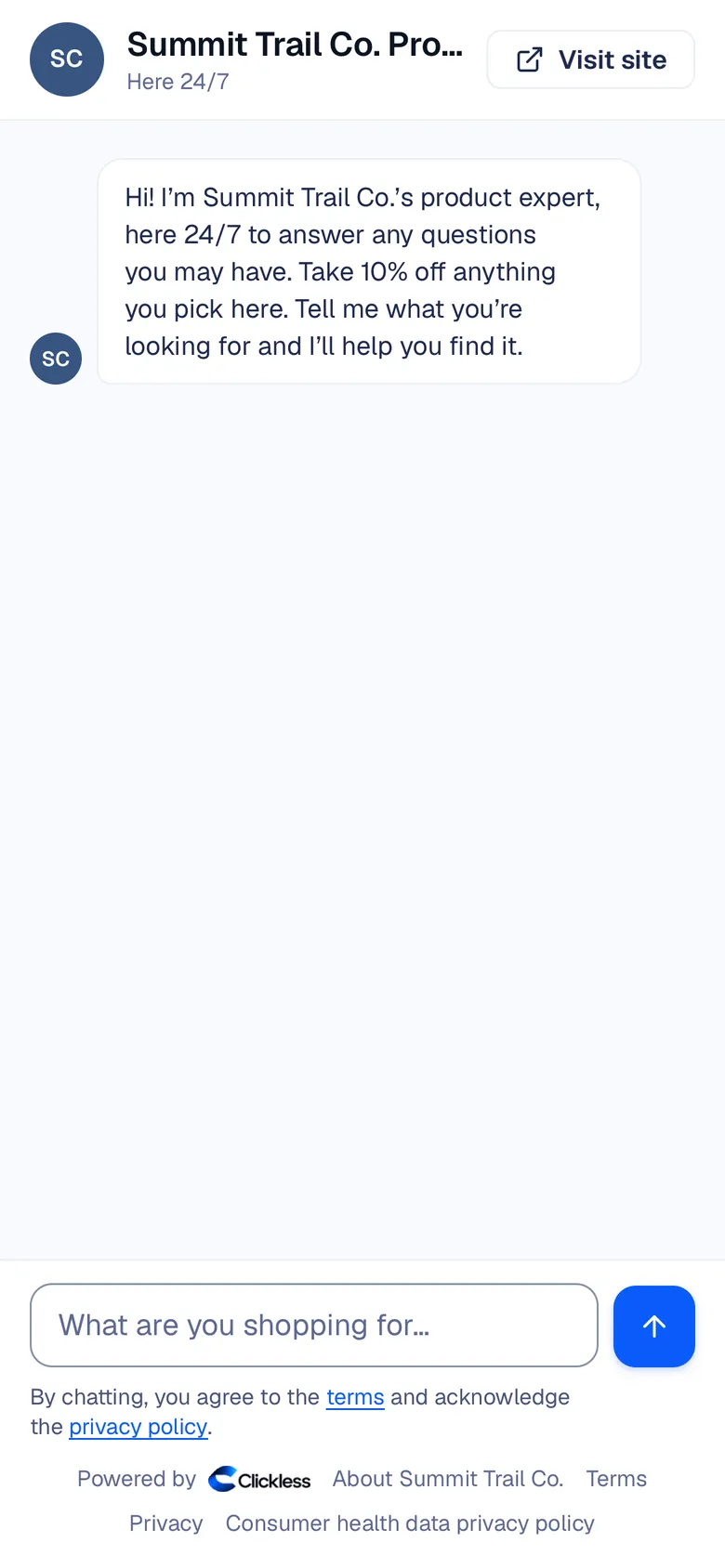
Practice with it. It answers in your voice. The message it opens with is: "Hi! I'm {your name}'s product expert, here 24/7 to answer any questions you may have." It never poses as you.
Run the final check. Before it goes out, it answers 9 test questions. Share your link after that check.
Share your link. Put it in your bio, a post, a YouTube description, or a YouTube comment. YouTube has no direct messages, so the link is how a creator shows up there. No following is needed. It works in phone browsers and in in-app browsers.
Every reply it writes is checked before it is sent. Asked whether it is a person, it says it is your AI product expert, not a person. Before any link it says: "Heads up: I earn from links I share." The sale is traced from that link through the brand's checkout, the store reports the order back, and it is credited to you. Each order is credited to one Product Expert at most.
The screen below is Summit Trail Co., a fictional example brand, not a creator and not a customer. It shows the kind of chat your link opens. Prices on the screen are example data, not a result.
You can read every conversation and pause the Product Expert everywhere at once. In a health chat you see the outcome, not the words, and those words are deleted after 30 days. Nothing a shopper says is sent to an ad platform.
Clickless uses Meta's official messaging API. The Product Expert replies to people who message it or comment. It never sends a cold message, and Clickless does not use unofficial tools or extra accounts. Clickless is not affiliated with Meta.
5
Can you bring ManyChat keywords over?
Moving a keyword list from ManyChat is rolling out. You paste or upload the list, and nothing goes live until you switch it on. Switching on waits on Instagram. Your link does not wait: share it today, or point a ManyChat button at it.
The pictures below are illustrations, not product screens. Comments and direct messages on Clickless are rolling out.
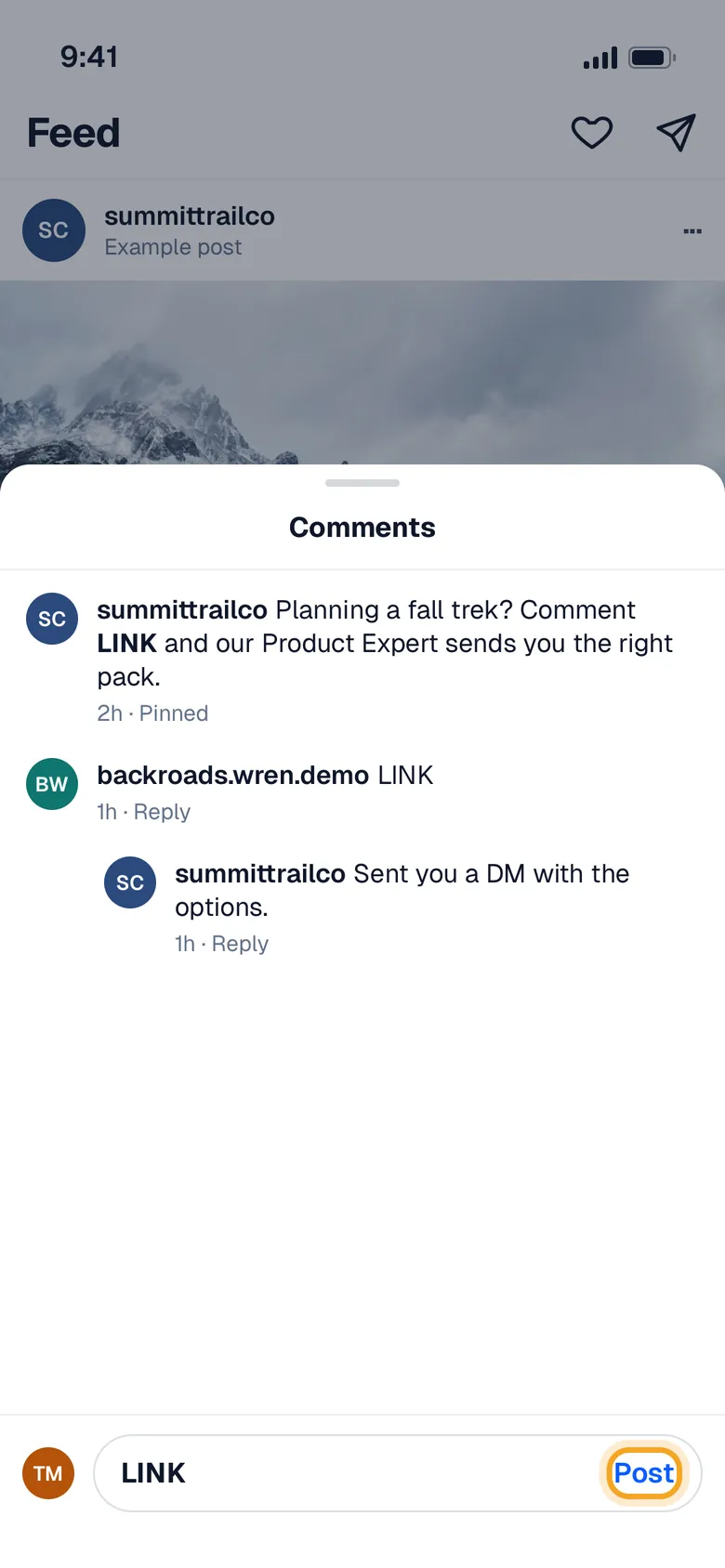
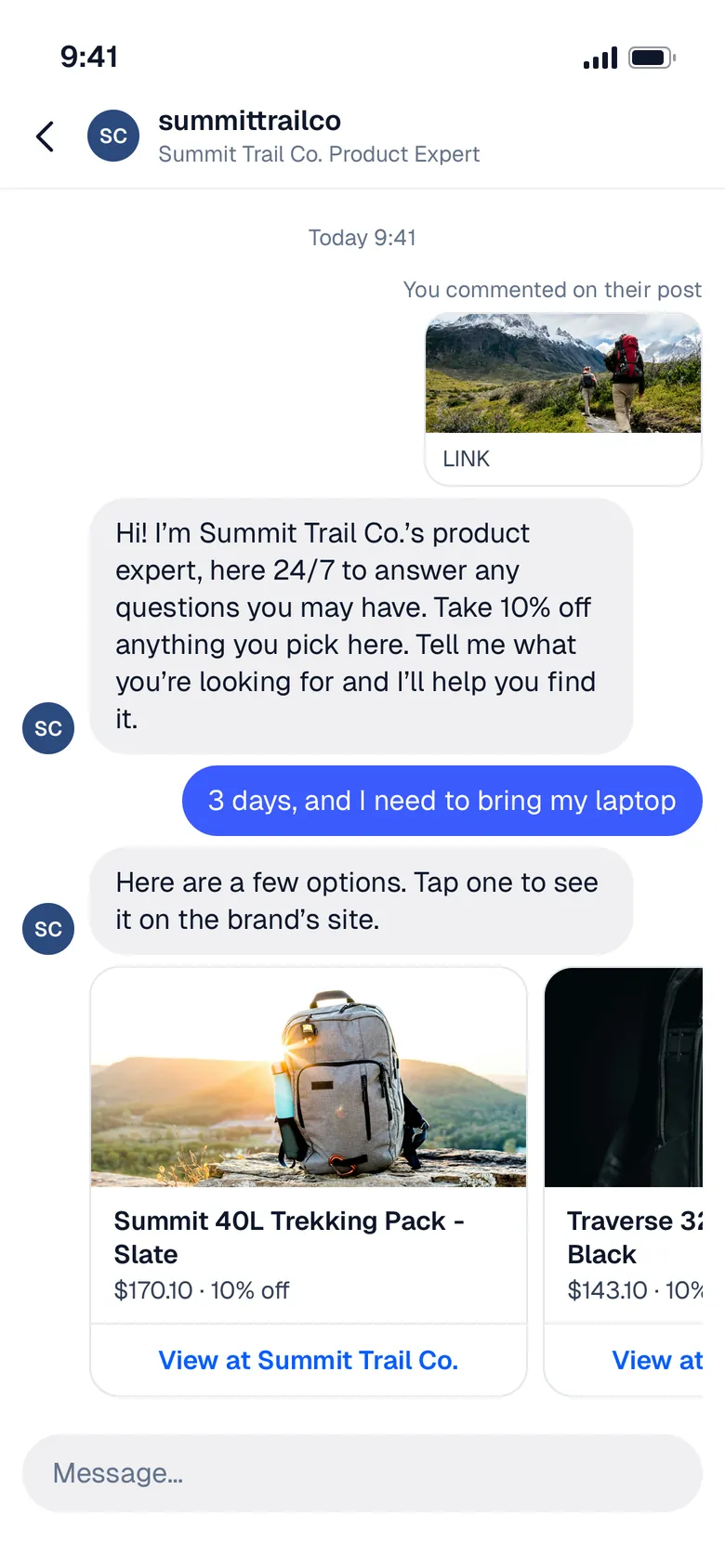
Once Instagram is on for your account, a follower who comments a word you chose gets a direct message from your Product Expert, from your own account. It keeps answering until checkout, and the sale is traced to that post.
6
Should you use ManyChat and Clickless together?
Yes, if both jobs are real. Keep ManyChat for giveaways, freebies, and list building. Send shopping questions to your Product Expert: link to it from a ManyChat flow today, or give it a keyword of its own once Instagram is on for you. It lives at its own link, so it doesn't replace a tool you already run.
7
What do you keep if someone buys?
On brands on Clickless, you earn a share of the commission Clickless receives on each sale your Product Expert sends, and on affiliate network offers too. The brand pays the fee on creator sales. You don't.
Your share is on pricing. We don't publish earnings estimates.
Payouts are rolling out. Until they switch on, earnings wait in your balance. Once on, they go out weekly on Fridays through Stripe Connect Express once a balance reaches $25 ($10 on the last Friday of a quarter). Smaller balances roll over and don't expire. The states are pending, then available, then paid, and a payout comes from money the brand or network has already paid Clickless, after the return window. Direct brands clear in about two weeks. Network offers clear on the network's cycle. A refund comes off a later payout. A payout is never negative, and nobody is sent a bill.
The full split is on pricing, in the same words for brands and creators.
8
Where do you get the link?
Get your Product Expert link. It is free to start. How a sale is traced, in short, is on how it works.
ManyChat is a trademark of its owner. Clickless is not affiliated with ManyChat. Meta, Instagram, Messenger, and WhatsApp are trademarks of Meta Platforms, Inc. ManyChat's prices and features above are from its public help center as read on October 31, 2026, and may have changed. Clickless is based in Scottsdale, Arizona.
Sources
Questions creators ask
Is Clickless free for creators?
It's free to start. Recommending brands on Clickless is free, and no following is needed. You earn on sales from brands on Clickless. The brand pays the fee on creator sales, not you.
Can I move my ManyChat keywords?
Moving from ManyChat is rolling out. You paste or upload your keyword list, and nothing goes live until you switch it on. Switching on waits on Instagram: comments and direct messages switch on once Meta approves the app. Your link works today.
Does it work in Instagram direct messages today?
Instagram comments and direct messages are rolling out. They switch on once Meta approves the app. Your link works today, in phone browsers and in-app browsers.
Do I need a big following?
No. Your Product Expert answers whoever asks it, at your link, so it works with any audience size.
Does it pretend to be me?
No. It never poses as you. The message it opens with says it is your product expert. It says it earns a commission before any link. Asked whether it is a person, it says it is your AI product expert, not a person.
When do creator payouts go out?
Payouts are rolling out. Until they switch on, earnings wait in your balance. Once on, they go out weekly on Fridays through Stripe Connect Express once a balance reaches $25, from money the brand or network has paid Clickless, after the return window. Smaller balances roll over and do not expire.
Related guides
ManyChat vs Clickless for creators (Nov 2026)
ManyChat bills by active contacts. Clickless is free to start: a Product Expert answers follow-ups on products you approve. Checked Oct. 28, 2026.
Read the guide: ManyChat vs Clickless for creators (Nov 2026)
Answering the follow-up question: ManyChat's AI vs a Product Expert
ManyChat AI replies answer from text and public URLs you add. A Product Expert answers the next shopping question from products you approve.
Read the guide: Answering the follow-up question: ManyChat's AI vs a Product Expert
How to move your ManyChat keywords to Clickless
Paste or upload your ManyChat keywords. Nothing goes live until you switch it on. Your link works today; Instagram comments are rolling out.
Read the guide: How to move your ManyChat keywords to Clickless

Get your Product Expert link. It’s free to start.
Approve the products you already recommend, practice with it, and share your link.