

Guide · October 2026
AI product quiz for Shopify: how to run one per ad
To run a product quiz per ad on Shopify, put the quiz where the ad lands instead of on a separate quiz page. Each ad opens your Product Expert, and you choose whether that ad’s visitors start with a chat, tap-to-shop buttons or a short quiz. The quiz narrows your catalog in up to four questions, shows one to three products with your deal applied, and hands off to your Shopify checkout. Anything the shopper types after that, the Product Expert answers.
1
Why run a quiz per ad?
An ad makes a promise, and the first screen after the tap should keep it. A “find your moisturizer” ad should open on that question, not on your home page and not on a quiz about something else. Marketers call this message match: the ad, the page and the offer say the same thing.
A quiz page that serves every ad can’t do that. A quiz per ad can:
- The ad’s question comes first. A “Find your pack in one chat” ad opens on trip length, not on a menu.
- Your deal is already in the price. The result shows each product at its price with your deal, and each ad can carry its own deal.
- You can see which ad’s quiz sold. Each ad gets its own row in the Ads report, with opens, chats, site visits, sales and revenue.
In Clickless, message match is set per ad: each ad can have its own First line for this ad, What this ad is about and Products to lead with, and its own opening from How the chat opens: Chat / Buttons / Quiz.
2
How does the quiz work?
| Part | What it does |
|---|---|
| Questions | Up to four, asked in order |
| Answers | Two to four per question. Each answer shows chosen products, a category, words in the product name, a price band, or any product |
| Skip | Every question has “Skip, I’ll just ask”, which drops the shopper into the chat |
| Result | One to three products that fit every answer, your Products to lead with first, then the lowest price, with photos, prices and your deal, plus an optional line such as “Your offer is already in the price” |
| Path check | Check every path lists every way through the quiz and the products each one shows. A quiz with a path that shows nothing can’t be saved |
| After the result | The shopper can keep asking. The Product Expert answers from your site, catalog and approved answers |
Questions
- What it does
- Up to four, asked in order
Answers
- What it does
- Two to four per question. Each answer shows chosen products, a category, words in the product name, a price band, or any product
Skip
- What it does
- Every question has “Skip, I’ll just ask”, which drops the shopper into the chat
Result
- What it does
- One to three products that fit every answer, your Products to lead with first, then the lowest price, with photos, prices and your deal, plus an optional line such as “Your offer is already in the price”
Path check
- What it does
- Check every path lists every way through the quiz and the products each one shows. A quiz with a path that shows nothing can’t be saved
After the result
- What it does
- The shopper can keep asking. The Product Expert answers from your site, catalog and approved answers
The quiz itself follows your rules. No AI picks its results, so every path shows exactly what you checked. The AI is in the chat that follows: “Is it fragrance-free?”, “Will it fit in an overhead bin?”, “What’s the difference between these two?”
3
How do you set one up on Shopify?
Connect your Shopify store. Clickless finishes the connection with you, usually by the next business day, and imports your catalog. Most brands are live within two business days.
Write the quiz. Make a quiz opening under How the chat opens. Start from the question your ad asks. Keep each question to one decision: skin type, trip length, budget, size.
Map each answer to products. Point each answer at chosen products, a category, words in the name or a price band. Then use Check every path and fix any path that shows nothing.
Set the deal. Use your Product Expert’s deal, or give the ad its own.
Choose how each ad opens. Give the quiz ad your quiz as its opening. Other ads can open on a chat or buttons, and ads without their own setting get the opening you choose for All other visitors.
Put the link in your ad. Paste your Product Expert’s ad link, the whole link with Meta’s URL parameters, into the ad’s website URL. TikTok and Google ads get their own links, on Product Expert → Ad links.
Test it. Use Test two openings (50/50) to split the ad between the quiz and a plain chat. Or run a Meta A/B test of the quiz ad against your landing page, as in How to split test a Meta ad’s destination.
4
Example: one quiz, from ad to checkout
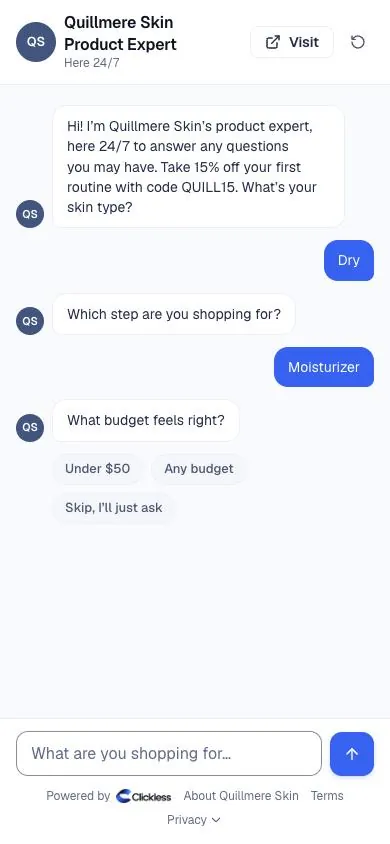
Example brand (fictional). Quillmere Skin is a made-up skincare brand Clickless uses for demos. Its “Find your moisturizer” ad opens on a four-question quiz:
- What’s your skin type? Dry · Oily · Combination · Sensitive
- Which step are you shopping for? Cleanser · Serum · Moisturizer · A full routine
- What budget feels right? Under $50 · Any budget
- Fragrance-free, or is a light scent fine? Fragrance-free · Either is fine
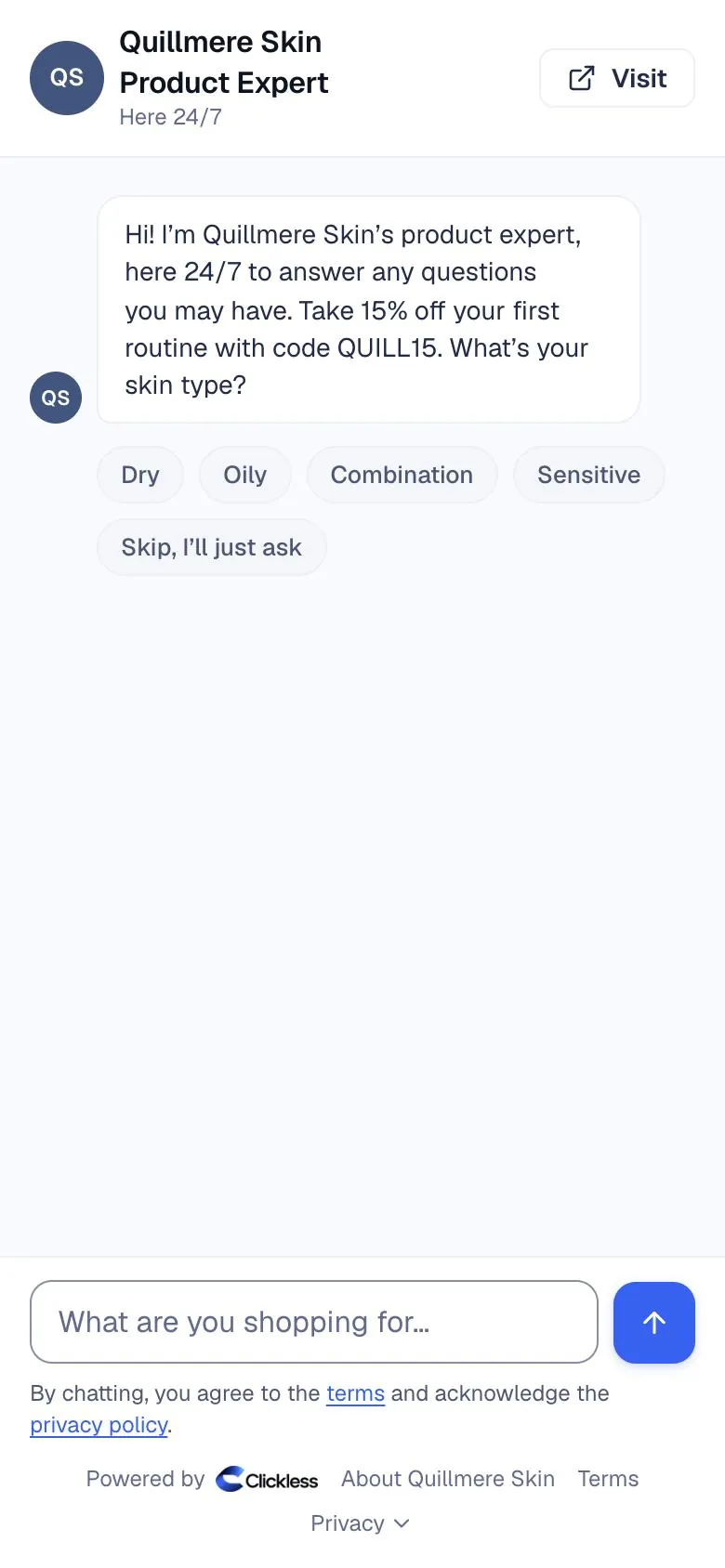
A shopper taps Dry, Moisturizer, Under $50 and Fragrance-free. The result shows the Rich Comfort Cream at $32, down from $42 with the brand’s $10-off deal on that cream, and a line saying the deal is already in the price. From there the shopper can keep asking in the same chat. On a real store, one tap goes to the brand’s own checkout with the cream in the cart; Quillmere’s taps land on a demo store page where nothing can be bought.
Each of the 64 paths through that quiz shows at least one product, which is what Check every path confirms before a quiz can be saved.
5
Quiz app or a quiz in a Product Expert?
Both are useful, and you can run both. They do different jobs.
| How a quiz on your store compares with a quiz inside a Product Expert | A quiz on your store (tools vary) | A quiz inside a Product Expert |
|---|---|---|
| Where it lives | A page or pop-up on your store | Where your ad link lands, before your store |
| A quiz per ad | Depends on the tool | Each ad can open its own quiz, buttons or chat |
| After the result | The recommended products, on your store | Follow-up questions answered in the same chat |
| Checkout | Your store | Your own checkout, with the product and deal ready |
| How a sale is counted | The tool’s own reporting | Traced to the ad and creative; a sale from an ad counts within 7 days of the click by default |
| How you pay | The tool’s own plan | 30% of what it saves you (founding brands), $0 if it doesn’t beat your cost per purchase; no monthly fee |
Where it lives
- A quiz on your store (tools vary)
- A page or pop-up on your store
- A quiz inside a Product Expert
- Where your ad link lands, before your store
A quiz per ad
- A quiz on your store (tools vary)
- Depends on the tool
- A quiz inside a Product Expert
- Each ad can open its own quiz, buttons or chat
After the result
- A quiz on your store (tools vary)
- The recommended products, on your store
- A quiz inside a Product Expert
- Follow-up questions answered in the same chat
Checkout
- A quiz on your store (tools vary)
- Your store
- A quiz inside a Product Expert
- Your own checkout, with the product and deal ready
How a sale is counted
- A quiz on your store (tools vary)
- The tool’s own reporting
- A quiz inside a Product Expert
- Traced to the ad and creative; a sale from an ad counts within 7 days of the click by default
How you pay
- A quiz on your store (tools vary)
- The tool’s own plan
- A quiz inside a Product Expert
- 30% of what it saves you (founding brands), $0 if it doesn’t beat your cost per purchase; no monthly fee
A quiz on your store fits when you want it on your own pages, such as your home page or a collection. A quiz in a Product Expert fits when the quiz is the first thing an ad’s visitors should see, and when you want the questions after the quiz answered too.
6
What should a good ad quiz ask?
- The question the ad raised. If the ad says “for every skin type”, ask skin type first.
- One decision per question. “Dry or oily?” is one decision. “Skin type and concerns” is two.
- Budget, when price varies a lot. A budget question keeps the result inside what the shopper will pay.
- Nothing you can’t act on. If every product is fragrance-free, a fragrance question doesn’t change the result. Cut it, or keep it only to reassure.
- No health questions. Keep questions about preferences and use, not medical conditions.
7
What does it cost?
You pay only out of what it saves you: your cost per purchase is read from your own ad account, not typed in, and checked against your store’s orders, and when your Product Expert beats it, Clickless keeps 30% of what it saves on each sale for founding brands (50% after the founding round). Doesn’t beat your number? You pay $0. No setup fee, no monthly fee.
Free 7-day test: no Clickless fee on sales in your Product Expert’s first 7 days live. You still pay for your own ads.
Questions brands ask
Does the quiz use AI to pick products?
No. The quiz picks products by the rules you set for each answer, your products to lead with first, then the lowest price, so every path gives the result you checked. The Product Expert’s AI answers whatever the shopper types after the result, or if they skip the quiz.
How many questions can a quiz have?
Up to four questions, with two to four answers each. Every question has a “Skip, I’ll just ask” option that drops the shopper into the chat.
Can different ads open different quizzes?
Yes. You set how the chat opens for each ad: chat first, buttons first or a quiz first, and different ads can use different quizzes. Visitors from ads without their own setting get the opening you choose for all other visitors.
Can I test a quiz against a plain chat?
Yes. Split one ad 50/50 between two openings, such as a quiz and a chat. Each shopper keeps their side. The report calls a side likely ahead only after 100 opens per side, and only when a gap that big would show up by chance less than 1 time in 20; otherwise it says it’s too close to call.
Where do shoppers check out?
On your own Shopify checkout, with the product and your deal ready. Clickless never takes payment.

Put a quiz on your next ad.
Set up your Product Expert, connect Shopify and give your next ad its own quiz. Free 7-day test: no Clickless fee on sales in your Product Expert’s first 7 days live; you still pay for your own ads.