

Guide · November 2026
How to build a shopping agent with MCP
To build a shopping agent with MCP, connect a client to Clickless's MCP server, search offers by what the shopper wants, show at most three with each offer's disclosure text, and hand the shopper the brand's checkout link once they say yes. The brand charges and ships. Clickless never takes payment or holds goods. Brands pay only when it sells, and there is no setup or monthly fee.
AI Product Experts that sell. You pay only when they do.
Clickless: AI Product Experts that sell. Brands pay only when it sells, and there is no setup or monthly fee. The commerce layer for AI agents. A key comes after an invite and a review. Join the waitlist on Clickless for agent developers. Payouts are rolling out.
1
What is a shopping agent built with MCP?
The Model Context Protocol specification (revision July 28, 2026) is an open protocol for connecting an application to tools. A host is the application, a client sits inside it, and a server exposes tools the application calls.
A shopping agent is that application. It talks with a person, calls a tool when they ask for a product, and shows what came back. Clickless runs the server, so the app does not have to.
The endpoint is https://mcp.getclickless.ai/mcp, Streamable HTTP. The same calls exist as REST at https://api.getclickless.ai/v1, in the API reference. The MCP server page lists the tools, and the quickstart is the account setup. How a sale is credited is the affiliate program for AI agents. This page is the connection and the order of calls.
A brand's Product Expert and a creator's Product Expert are Clickless chats. This guide connects an app the developer already runs.
2
How do you connect a client?
Join the waitlist. Open Clickless for agent developers and ask for a key. A key comes after an invite and a review. There is no self-serve key on October 27, 2026.
Accept the terms and request live access. The quickstart shows where that sits, on the app's keys. Read the Creator and developer terms before requesting live access. There is no hosted sandbox with test brands, and a
ck_test_key is refused. Build against the live server with the live key. (Clickless quickstart, read October 27, 2026.)Point the client at the server. Send the live key as
Authorization: Bearer. The server is stateless: there is no session to keep, and each request is rate limited per key. A client that can send an API key header can connect. The docs name Claude Code and Cursor. (MCP server, read October 27, 2026.)Leave OAuth connectors unconnected. ChatGPT and Claude.ai custom connectors sign in with OAuth. This server does not support OAuth, so those connectors cannot connect today. (Clickless MCP server docs, read October 27, 2026.)
From Claude Code, the command on the docs page is:
claude mcp add --transport http clickless https://mcp.getclickless.ai/mcp \
  --header "Authorization: Bearer $CLICKLESS_API_KEY"
A client that takes a URL and headers uses a config like the one below. Check that client's docs for the file name, and for whether it wants the type field.
{
  "mcpServers": {
    "clickless": {
      "type": "http",
      "url": "https://mcp.getclickless.ai/mcp",
      "headers": { "Authorization": "Bearer ck_live_…" }
    }
  }
}
Keep the key in a secret store. A missing or wrong key returns HTTP 401 before any tool runs.
3
Which tools do you call, and in what order?
Call the tools in this order for one shopper. They are the same calls as the REST API.
The person says what they want, in their own words.
Call
search_offerswith that need. Show at most three offers, each with its disclosure text and the price and deal as returned.If they ask about an offer again later, search again before showing it, so a new token can ride to checkout.
When they pick one offer, call
approvewith that offer's token, thencheckout_handoffwith the same token, and give them the link.They pay the brand. The store reports the order. Read
earningsfor the balance.
| Tool | What the app does with it |
|---|---|
search_offers | Offers matching the need, with the deal, a commission preview, disclosure text, a token and a checkout link. At most three. |
get_offer | Re-checks one offer's price, deal and availability. No token, so search again before showing it. |
approve | Records that the person said yes to one offer. Call it after they do. |
checkout_handoff | The brand's checkout link for an approved offer, with a discount code when the response includes one. |
report_conversion | Reports an order the app saw confirmed. A claim, not a sale. Most orders arrive from the brand's store, so the app does not have to send this. |
earnings | Accrued, pending, payable, in transit and paid, for a month or a week. |
search_offers- What the app does with it
- Offers matching the need, with the deal, a commission preview, disclosure text, a token and a checkout link. At most three.
get_offer- What the app does with it
- Re-checks one offer's price, deal and availability. No token, so search again before showing it.
approve- What the app does with it
- Records that the person said yes to one offer. Call it after they do.
checkout_handoff- What the app does with it
- The brand's checkout link for an approved offer, with a discount code when the response includes one.
report_conversion- What the app does with it
- Reports an order the app saw confirmed. A claim, not a sale. Most orders arrive from the brand's store, so the app does not have to send this.
earnings- What the app does with it
- Accrued, pending, payable, in transit and paid, for a month or a week.
Each tool's description repeats the showing offers rules. A tool error comes back marked isError, with a code the API reference lists.
4
What must the app show before checkout?
The showing-offers rules, read October 27, 2026:
Show each offer's disclosure text every time the offer is shown. If it is marked sponsored, say so.
Show at most three. The MCP server returns three. A REST search can return up to ten so the app can narrow the list. The person still sees three.
Quote price, deal and availability as returned. Do not invent a price, a discount or a deal.
Approve after the person says yes to that offer. Do not approve for them, and do not buy on their behalf. Then give them the checkout link. They pay the brand.
Send the shopping need in plain words. Do not send a name, an email, a phone number or an address.
Age-gated offers come back when the request says the person's age has been verified. Send that flag after a real age check, and leave it off otherwise.
For a regulated offer, use the brand's own words and add none of your own.
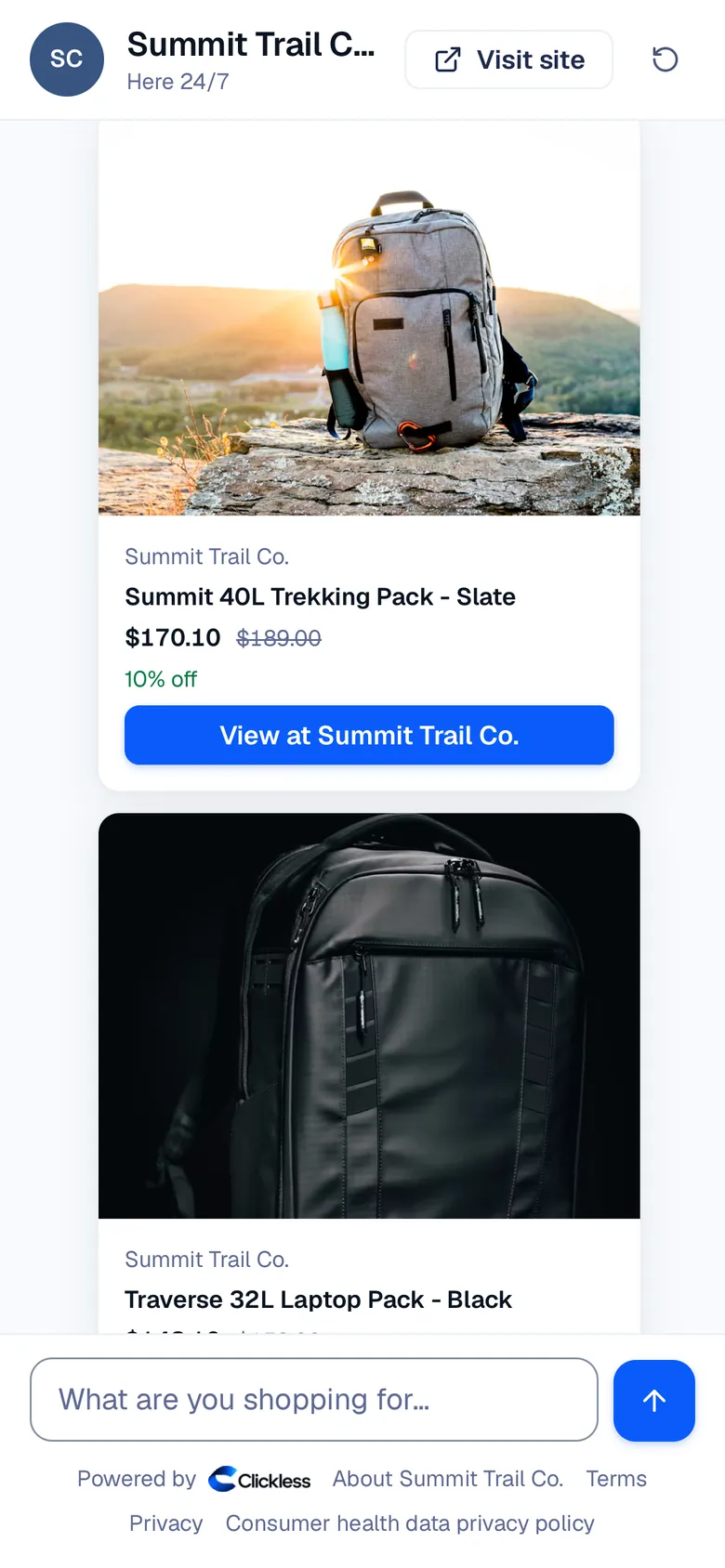
The screenshot below is not a developer's interface. It is a brand's Product Expert in web chat, an example, so the handoff is visible: a product, the price with the deal, and a button to the brand's own store. A developer's app shows those facts in its own interface, with the disclosure text beside each offer. The numbers on the screen are example data.
5
How is the sale traced?
The search returns a token. That token rides with the shopper to the brand's checkout, and the store reports the order back. Brands and the app see the same record of how the sale was traced, from the products shown to the tap, the checkout and the order. One order is credited to the Product Expert or app that sent the shopper.
For traffic that is not from an ad, an order is credited within 60 days of the offer being shown. That window is the measurement rule on pricing, as of October 26, 2026.
Brands pay only when it sells, and there is no setup or monthly fee. The shopper pays the brand on the brand's own checkout.
Affiliate network catalogs follow as each network approves sharing them with outside apps. Until a network does, the app sees offers from brands that work with Clickless directly. Clickless does not decide which products any other application recommends. The AI search check reports what those applications say. It does not change their answers.
Payouts are rolling out. Until they switch on, earnings wait in the balance.
Once payouts are on, they go out weekly on Fridays through Stripe Connect Express. Smaller balances roll over and do not expire. A developer is paid from money the brand or network has actually paid Clickless, after the return window. Each sale moves from pending, to available, to paid. Direct brands clear in about two weeks. Network offers clear on the network's cycle. A refund or chargeback comes off a later payout. A payout is never negative, and nobody is sent a bill. The states are on pricing and earnings.
6
When does a store's own commerce endpoint fit?
Shopify's developer docs, read October 27, 2026, say the catalog and cart tools on a shop's older Storefront MCP path (https://{shop}/api/mcp) were removed. Catalog search, carts and checkout now sit on the Universal Commerce Protocol at https://{shop}/api/ucp/mcp (migration note). Shopify's carts and checkout guide, read the same day, says the merchant remains the merchant of record, and that an eligible app can complete checkout on that store or send the buyer to the merchant's checkout.
Use a store's UCP endpoint when the app should shop inside that Shopify store. Use the Clickless MCP server when the app should search offers from brands that work with Clickless directly and show the disclosure text with each offer. Brands pay only when it sells, and there is no setup or monthly fee. The shopper pays on the brand's checkout. The app does not complete the purchase.
Use both when the work needs both. A Shopify store can keep UCP for apps that shop that store, and publish an offer on Clickless for apps that recommend it next to other brands. How Clickless works is the short version of that handoff.
7
What is live for developers on October 27, 2026?
| Piece | Status |
|---|---|
| Agent API and MCP server, with docs | Live. Keys after an invite and a review. |
| Offers from brands that work with Clickless directly | Live. |
| Affiliate network catalogs for outside apps | They follow as each network approves sharing them. |
| Show at most three offers, with disclosure text | Live. The disclosure text is in the response. |
| Payouts through Stripe Connect Express | Rolling out. Earnings wait in the balance. |
| Drafting a store's Product Expert from its URL | Coming soon. |
Agent API and MCP server, with docs
- Status
- Live. Keys after an invite and a review.
Offers from brands that work with Clickless directly
- Status
- Live.
Affiliate network catalogs for outside apps
- Status
- They follow as each network approves sharing them.
Show at most three offers, with disclosure text
- Status
- Live. The disclosure text is in the response.
Payouts through Stripe Connect Express
- Status
- Rolling out. Earnings wait in the balance.
Drafting a store's Product Expert from its URL
- Status
- Coming soon.
The next step is a key. Join the waitlist. After the invite, follow the quickstart, connect with the MCP server page, and keep the showing offers rules in the app's instructions.
Sources
Questions developers ask
How do I get a key for the Clickless MCP server?
Join the waitlist at getclickless.ai/agent-developers. A key comes after an invite and a review. The quickstart is the setup that follows the invite.
Which offers can the app show?
Offers from brands that work with Clickless directly. Affiliate network catalogs follow as each network approves sharing them with outside apps.
Is there a setup or monthly fee?
No. Brands pay only when it sells, and there is no setup or monthly fee. Payouts are rolling out, so earnings wait in the balance until payouts switch on.
Does Clickless charge the shopper?
No. The shopper pays on the brand's own checkout, and the brand ships. Clickless never takes payment or holds goods.
When do payouts go out?
Payouts are rolling out. Until they switch on, earnings wait in the balance. Once on, they go out weekly on Fridays through Stripe Connect Express. Payment comes from money the brand or network has paid Clickless, after the return window.
Why can't a ChatGPT custom connector connect?
ChatGPT and Claude.ai custom connectors sign in with OAuth. The Clickless MCP server does not support OAuth, so those connectors cannot connect today. A client that sends an API key header can, including Claude Code and Cursor.
Related guides
Product search API for AI agents, with attribution
Search a brand's products by what a shopper wants, show the disclosure text, and credit the sale on the brand's own checkout.
Read the guide: Product search API for AI agents, with attribution
Affiliate program for AI agents
An affiliate program for AI shopping agents: search product recommendations, show them with disclosure, and keep 80% of the commission Clickless receives.
What is an AI Product Expert?
An AI Product Expert is a chat agent that knows a brand’s products, answers shoppers’ questions and sends them to the brand’s own checkout.

Join the waitlist for a key.
Once you’re invited: get approved, create a live key, then search, approve, hand off, and see the conversion land.